We’ve had the capability to host BIM data in Trendspek for a while now, but actually using that data has been limited to viewing or comparing it with the 3D model. The recent release of our new inspect experience has changed that.
When you're working across large facilities, understanding which component you're looking at is often just as important as understanding its condition. And when inspection information and BIM data are living in completely separate systems, navigating between the two adds another step to the workflow that, realistically, doesn’t need to be there.
So we’ve removed the step. Now you can query BIM information directly from the 3D model, search the BIM model for elements, and enrich your annotations with BIM data — all without leaving Trendspek.
Here’s how it works
Your BIM metadata can be accessed in several ways, depending on what you’re looking to achieve. Trendspek automatically associates underlying BIM elements to the 3D model, so when BIM data is uploaded alongside your asset, it becomes available throughout the inspection workflow.
BIM integration lets you:
- Filter and highlight BIM components
- Search the BIM model for elements
- Enrich your annotations with BIM data
- Compare BIM data side-by-side or overlaid with the 3D model
Finding BIM information in context
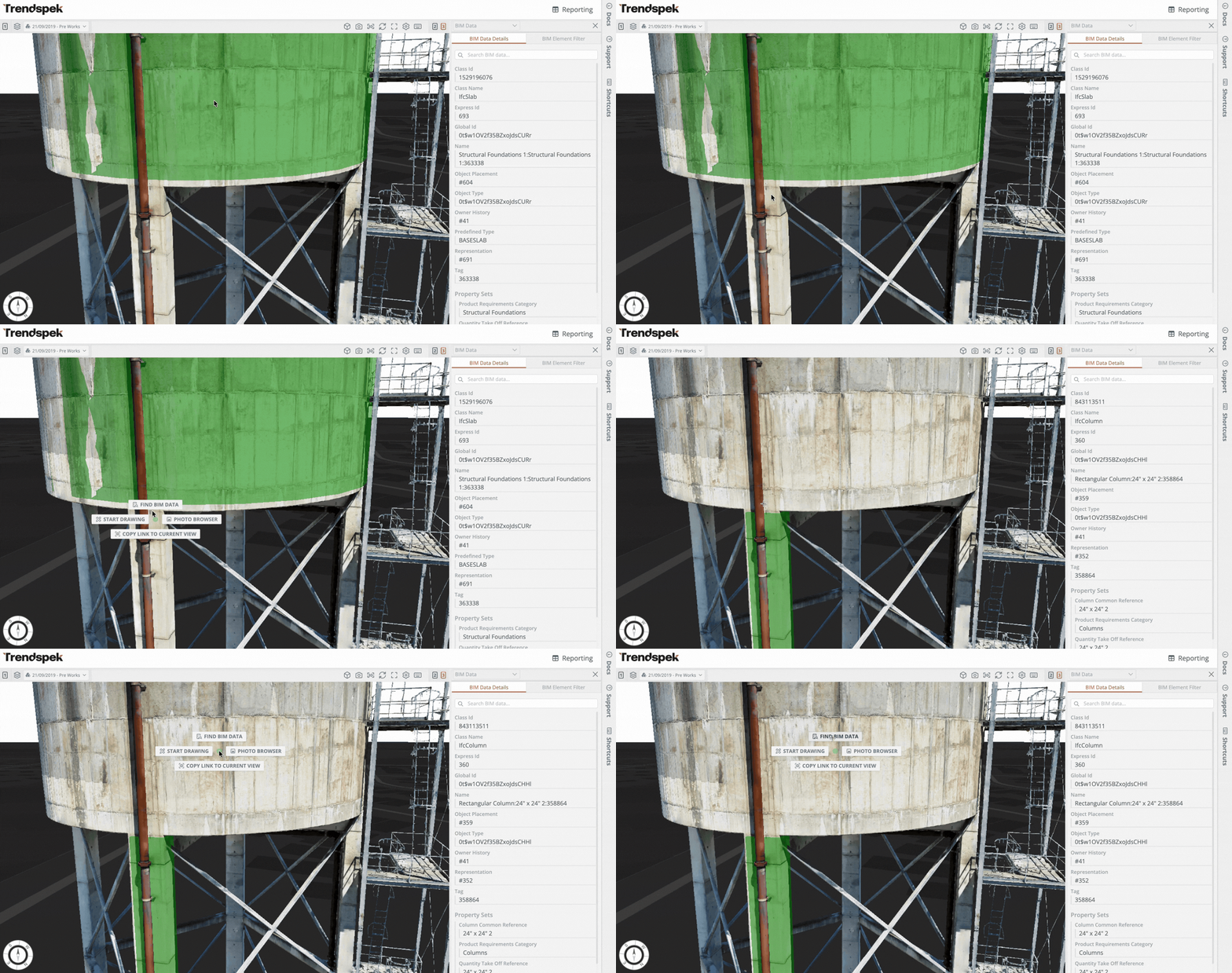
Rather than navigating through a BIM model in a separate application, you can find and view BIM information directly within Trendspek.
Matching BIM elements are automatically associated with the Trendspek 3D model, with embedded metadata such as element IDs, materials and system information displayed in a panel alongside your 3D model.
Enriching inspections with BIM data

With the BIM Integration, every annotation on your 3D model is linked to its corresponding BIM element when created.
Your annotations automatically inherit relevant BIM information, creating richer records without manually copying details between tools. This associated metadata is also available through the Trendspek API, making it easier to integrate this information with downstream systems.
Comparing design with reality

Overlay or display the BIM model side-by-side with the 3D model to review design intent alongside the asset’s current conditions.
Comparing both datasets in a single workspace makes it easier to validate construction, investigate changes, identify undocumented modifications, or better understand how an asset has evolved over time.
Your design data and inspection data can now be connected in one place; making it easier to understand your assets, capture richer inspection records, and make better-informed decisions throughout the asset lifecycle.
If you'd like a walkthrough of the new BIM Integration, or have questions about transitioning your workflow, we'd love to help. Reach out to andrey.derevyanko@trendspek.com