Whether you're validating a defect, planning maintenance or preparing a recommendation, the information you need changes. The new Inspect experience lets your workspace change with it.

Reviewing the condition of an asset rarely involves looking at a single source of information. Inspection photos, previous findings, measurements, BIM information, asset history, they all contribute to understanding what's changed and deciding what happens next.
The new Inspect experience brings this information together within a single workspace, so the context you need stays visible alongside the model.
Configure the workspace around the job you're doing
No two inspections are exactly the same, so why should your workspace be?
Instead of giving every user the same fixed layout, the Inspect page is now built around a configurable environment.
Alongside the main 3D model, you can open up to three additional panels containing whatever information is most relevant to your task at hand.
Available panel options include:
- Data Panel (annotations & folders)
- Annotation details
- Photo Browser
- Camera Browser
- BIM data
- Asset panel
- A second synced 3D canvas (side-by-side viewer)
Common inspection workflows
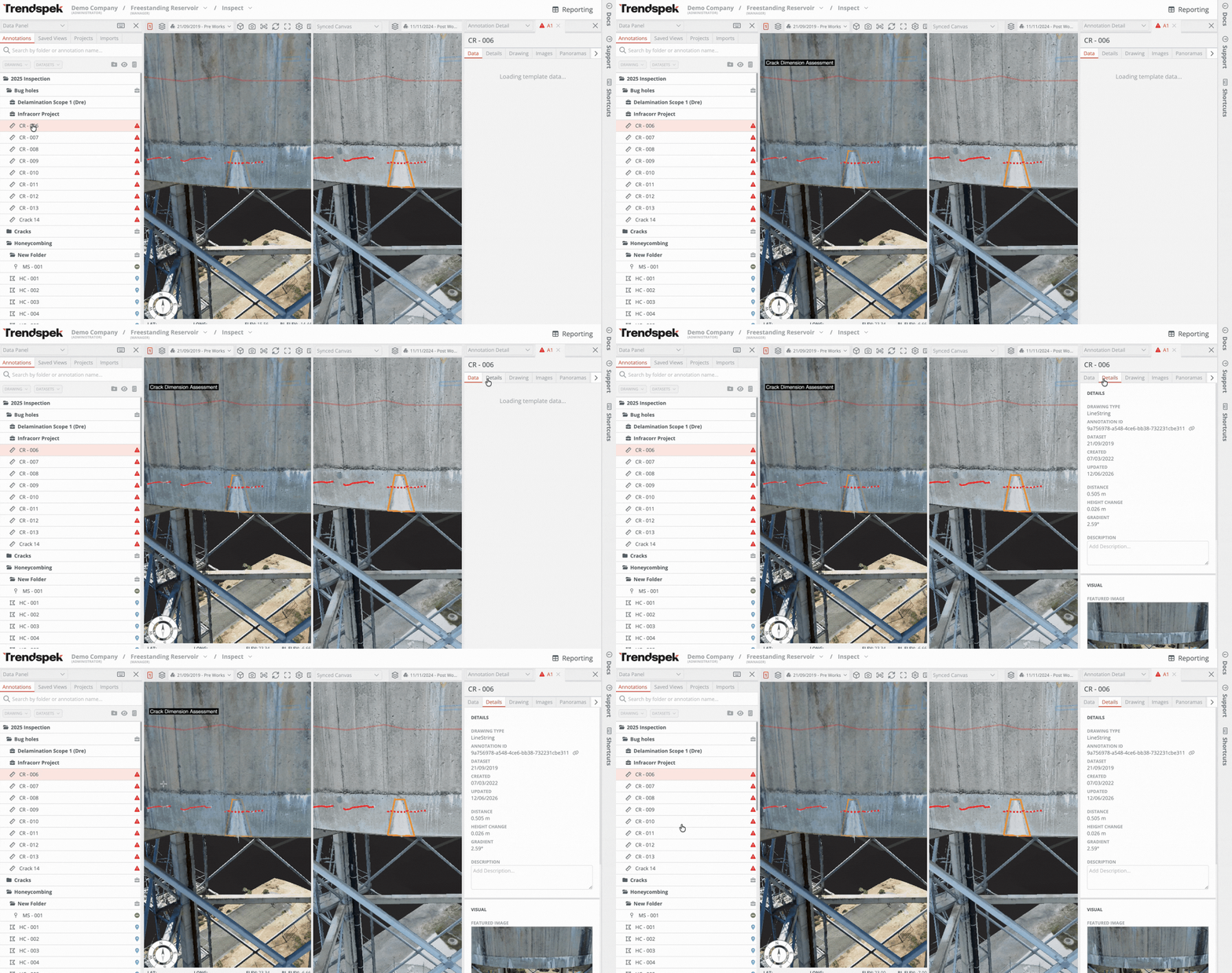
01. Validating a defect before recommending remediation
Before recommending remediation, you need to validate what you're actually seeing.
Measurements, inspection history, supporting photos and the asset model all contribute to that decision.
Now, you can open annotation details in a panel beside the Photo Browser to review this information, keeping the model visible throughout the process.
02. Review inspection findings alongside BIM data
When you're working across large facilities, understanding which component you're looking at is often just as important as understanding its condition.
Keeping BIM information beside the model makes it easier to identify components, confirm asset metadata, and move between design information and inspection findings without changing context.
.gif)
03. Comparing deterioration between inspection cycles
Maintenance decisions shouldn’t be based on a single inspection, but on understanding how the condition of an asset has changed over time, how quickly it's changing, and whether that change is significant enough to warrant intervention.
Open a second synced canvas beside the current model to compare inspection captures side-by-side, whilst keeping annotations visible.
Instead of switching between previous reports, layers or inspection records, you can review the evidence together within the same environment.
04. Presenting findings without losing context
Whether you're discussing a defect with a colleague, presenting a remediation scope to a client, or walking a contractor through upcoming work, switching between photos, annotations and reports breaks the flow of the review.
Keep the model, supporting imagery and annotation details visible together, so everyone is looking at the same evidence at the same time.
Instead of explaining where a defect is or jumping between different windows, you can walk through the condition, the supporting evidence, and your recommendation from a single workspace.
The new Inspect experience is rolling out to all Trendspek users. If you'd like a walkthrough of the new layout or have questions about transitioning your workflow, we'd love to help. Reach out to success@trendspek.com
Frequently Asked Questions
Does this replace the existing Inspect page?

Yes. The Multi-Panel Inspect experience is the new default Inspect layout. While the interface has changed, the core inspection workflows remain the same.
Will I need to relearn Trendspek?
No. Existing inspection workflows haven't changed. The biggest difference is that supporting information can now be opened in configurable panels instead of fixed views.
Can I customise which panels are open?
Yes. Each panel can display different information depending on what you're working on, including annotations, BIM data, photos, assets and a synced second canvas.
Who benefits most from the new layout?
Anyone reviewing inspection data.
Whether you're validating defects, planning remediation, comparing inspection cycles or reviewing BIM information, the new layout reduces the amount of navigation required to bring that information together.
Does this work with Projects?
Yes. The same multi-panel workspace is used throughout the Projects experience, creating a more consistent workflow between inspection and project planning.
Why did Trendspek redesign the Inspect page?
As inspection programs have grown, so has the amount of information engineers need to review before making maintenance decisions.
The redesign brings more of that information into a single configurable workspace, reducing unnecessary navigation while keeping the 3D model at the centre of the workflow.