Maintaining critical infrastructure is a constant balancing act. You’re trying to keep production moving, navigating the costs of shutdown and turnaround planning, and making sure everyone gets home safe at the end of the day or rotation.
Sending a team out to a remote site or an offshore platform is a massive logistical exercise, often done without full context on what they actually need to look at once they get there.
If you’ve ever had to inspect a tank, pipe run, or the underside of an offshore platform, you know the drill: it’s either days of dangling people off ropes or building complex scaffolding just to get eyes on a weld. And if the weather turns, the whole thing gets pushed back, with the costs continuing to accumulate.
We’ve seen this play out time and time again across the industry.
Asset information, like previous inspection history, remediation work, and maintenance decisions, is usually scattered across old PDFs, Excel sheets, static photos, and even over emails or texts.
When a newcomer starts or you switch consultants, trying to piece together a linear history of that asset is almost impossible, let alone for it to be an objective view.
Currently, 6 of the top 10 Oil and Gas companies in Australia use Trendspek to solve this.
They’re moving away from fragmented data and instead building a persistent digital record of their assets. It means they can plan with more confidence and actually track how a defect is progressing over time.
Here’s how those teams are using the platform on a daily basis:
1. Virtual GVI and CVI inspections
Most Level 1 and Level 2 inspections don't actually require a physical presence on-site if you have the right data
.gif)
Teams are now capturing their sites, whether it’s a flare tip, a pipeline, or an offshore rig, using drones or ROVs and importing that data into Trendspek. The best part? You don't need to shut down the site to collect this data. Production keeps humming away while the drone does the work.
Because the resulting 3D models are engineering-grade (often down to 1mm/pixel resolution), you can conduct these inspections from your desk (or pub - we don’t judge)
How it works in practice:
- Triage before mobilisation: Instead of sending a rope team "just to have a look," you use the model to find the specific areas that actually need a physical hands-on check
- Total coverage: You can pan, zoom, and assess the condition from any angle. It’s much easier to spot early-stage corrosion, cracking, or signs of CUI when you can look at the asset from angles a human on a ladder simply couldn't reach
- Data-agnostic: You can pull in drone imagery, LiDAR, and subsea data into one view. Every time you don't have to hang someone over the edge, you’re avoiding a 10x jump in cost and risk
2. Structured engineering and reporting
One of the biggest time-wasters for integrity engineers is rebuilding reports from scratch or trying to guess the scale of a defect from a grainy photo
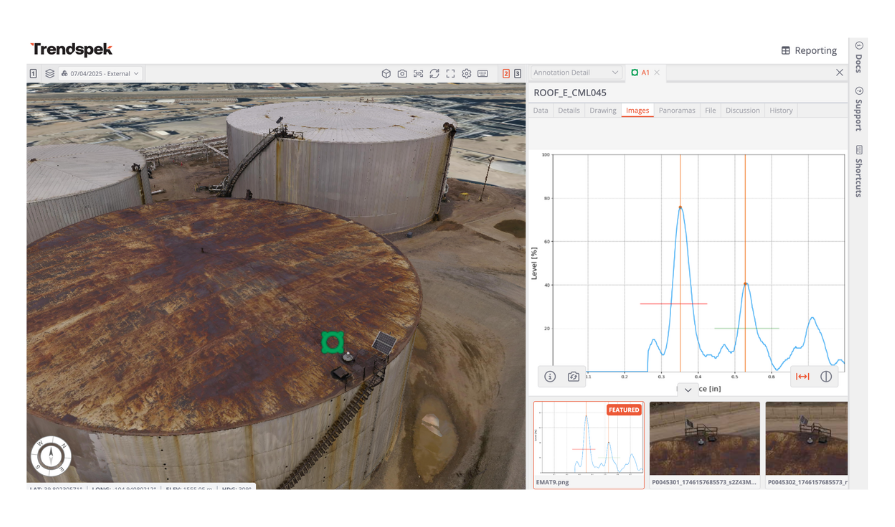
We’ve focused on turning visual data into something you can actually measure and contextualise.
In Trendspek, you tag defects directly within the spatial model. Because it’s a true 3D environment, you can see exactly what is around the point of interest. Measure distances, areas, and even surface deflection or volume to millimetre accuracy.
What this looks like for your workflow:
- Custom Templates: Every business has its own way of reporting. You can set up templates so that every contractor and stakeholder is using the same inputs. This ensures your data is audit-ready and prevents the "knowledge drain" that happens when someone leaves.
- Overlaying NDT data: You can take your ultrasonic testing (UT) or CUI readings and overlay them directly onto the 3D model, giving you a "heat map" of the asset’s health
- Asset history and security: Compare previous models side-by-side to see exactly how a patch of corrosion has progressed. Our platform is built with high-level encryption and secure data residency, so your historical record is protected and stays exactly where it needs to be for long-term compliance.
3. Better certainty for shutdowns and turnarounds
Surprises during shutdowns can cost thousands, even millions in delays
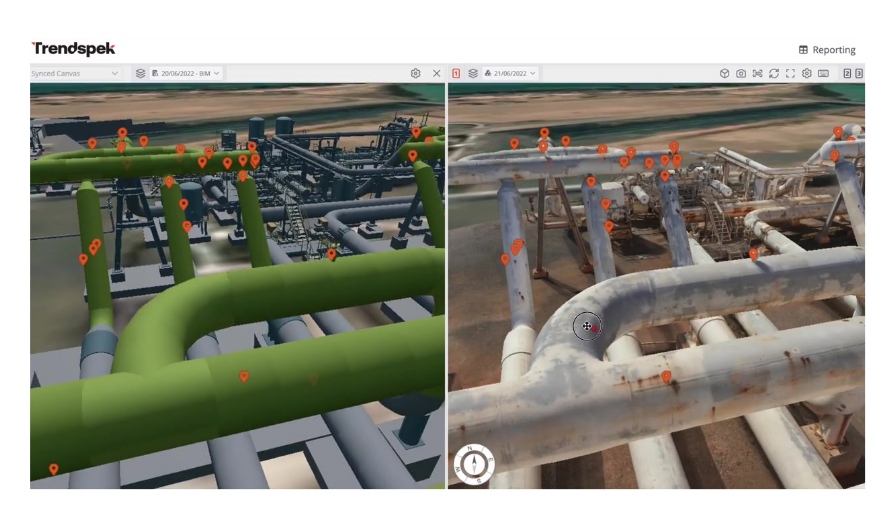
Traditionally, teams plan using outdated drawings, PDFs and scattered imagery, often sending crews to the site just to confirm the scope of work.
Our users are now using their spatial models for remote walkdowns with their contractors. Instead of a vague description of a job, the scope is quantified and visual. You can get three different contractors in a room (or Teams call), all looking at the same 3D flare tip, and agree on the requirements right then and there.
How it changes the execution phase:
- Tighter bidding: Contractors can see exactly what they are bidding on. They can measure the surface area for coating or the dimensions for scaffolding before they even set foot on-site. This leads to more competitive bids and far fewer "variation" claims once the job starts
- Pre-fabrication confidence: Because the measurements are accurate, teams can pre-fabricate replacement parts months in advance while the plant is still running, rather than waiting for "discovery work" during the shutdown.
- Living digital record: Site teams use the model to locate and sequence their work. If they find a new issue, they capture it in context to update the record immediately. This keeps the schedule on track and ensures everyone is looking at the same ground truth.
Watch the quick walkthrough
Demo transcript

Welcome to Trendspek. Trendspek is a 3D enabled platform that allows operation and maintenance teams across an asset life cycle communicate and execute on scopes faster, safer, and more cost-effectively.
Whether that's inspections, remediation, capital works, or even turnaround and shutdown planning, everything can be done in Trendspek.
We are asset agnostic. So whether that's an onshore asset such as a train, a tank or a vessel, nearshore such as a wharf or a jetty or even offshore like an under deck inspection, everything is available to be done in Trendspek.
So currently you're probably using a combination of platforms, applications, and maybe even paper-based forms to conduct your inspections and share that information downstream.
So where Trendspek takes that much further past just having a 3D model is being able to annotate and capture that data effectively and share it down to other teams as needed.
So today I'm going to show you really quickly how that can be done in a couple of clicks without necessarily needing to go out of the platform.
So as you can see we've got a range of different options for assets. Whatever you can take a photo of, we can bring into the system.
So I'm going to click in this case on this refinery. So you can see the scale of the assets that we're able to capture. Again, whether that's a sitewide refinery all the way through to an individual tank or vessel that's able to be done.
You can see that there's a lot of drawings and markups already done on this, which means the operations and maintenance and engineering teams have been busy.
And straight away, if I wanted to click on one of these, I can see the underlying data.
In this case, I want to zoom right in and I want to mark up in this case this particular tank.
So the first thing I can do is right-click and start drawing just like I would on any other piece of paper or any chain map or asset diagram.
In this case, I've got the spatial context to know where on this asset it is.
I can click start drawing and straight away, even just with this first line, I can see that this is just over 17 m of rise, which immediately gives me indication of how what equipment the access teams will actually need to do the level two and onwards inspections of this asset.
So firstly, I can map it, I can annotate it. I'm just going to couple more clicks here and I can complete this.
Once I click finish, straight away I'm met with some information such as area, perimeter, and a whole range of other things that I can apply here.
Now, as I mentioned before, it's really about capturing the information you need in the in how you need it.
So whether that's a WSCAM inspection template for a wharf for jetty or an API specific tank or vessel inspection or an internal custom template that you use for your reporting and inspections, we can replicate that using simple settings and no code.
So in this case, I'm going to do I'm going to right I'm going to click down and see all of my templates and I'm going to look at what we would call a best practice generic template.
And once I press press create that drawing is now linked to the data in that template.
So I can give this a name.
And you can see there there's some underlying data such as the original photos.
And I can change and see the underlying photos depending on where that asset is.
And then if I click on data this is where those template fields start coming up.
So I can have a defect description potential early corrosion and as I go through the system will prompt me to make sure that I'm saving this information structural element let's just say it's a wall asset link in case you want to connect it to downstream systems.
And as you can probably guess the process will go on to complete whatever template we need to be done.
So inspection methods we can click into other sections of a template again it can be as simple or as complex as you need.
Once I click save, that is now available as a markup or drawing.
So if I wanted to zoom out, we can see that markup there and straight away within a matter of minutes, I can click on that again.
It'll take me to that markup and I can straight away click in data and review what's been put in there.
So from inspection through to your remediation and site visit teams, they've already got that data downstream within minutes.