Reporting in Trendspek just got more powerful with two new releases: Advanced Template Fields and Annotate on Images.
.gif)
Advanced Template Fields
We’ve made Templates more powerful by releasing a suite of new customisable fields, Advanced Template Fields, allowing you to speed up workflows and enhance reporting outputs.
Why this release?
Advanced Template Fields expands the data types you can use within the Template Manager.
This upgrade streamlines your reporting by including new important details, such as date completed, why, and other relevant notes, enabling deeper analytics comparing template metrics over time.
Where previously users had Text and Multiselect as input options, Advanced Template Fields now include:
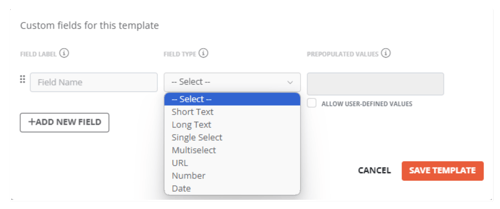
Short Text - e.g. names, short descriptions
Long Text - e.g. a paragraph description
Single Select - specify one selection from a list of options
Multiselect - specify possible values
URL - enter a link to another page or website
Number - numerical input
Date - opens up a calendar date picker
Note: You will only have access to the Template Manager if you have Edit Templates permission for your company.
Annotate on Images
We’ve given you more markup flexibility of your 3D asset with Annotate on Images.
Why this release?
This new feature allows you to draw pins and polygons on the source picture itself, which are reflected on the 3D Precision Reality Twin model in real-time.
This works in the same way that a standard annotation would in Trendspek. Simply right click on the image, drawn an annotation, style as required, and click finish when done.
Draw a point, a line or a polygon, and style it to your liking using colours and icons.
You can adjust, or move, your annotation by Right-clicking and dragging the point to the desired location.
Once finished, every source photo will show the annotation — this can be toggled off using the crosshair icon.
Annotations drawn on photos will be automatically reflected as an Annotation on the 3D model.
Other Trendspek updates
- We’ve improved Image Brightness and Contrast,
- We’ve upgraded the functionality of the Photo Navigation Strip to allow for easier scrolling and selection of photos.
- This makes Annotate on Images easier, by allowing users to scroll infinitely to the right (click and drag, or mouse-wheel) when selecting a photo from a different angles.
What comes next?
- Saved Views, this will allow you to organise your Inspection work into dedicated spaces within the platform.
- Improvements to exportable PDF Reports.
- Panoramic photo support.
To keep up-to-date with our latest product updates, sign up to our newsletter.